


TalkingParents: Co-Parent App
2.31.83K Reviews
App Specs
- Version
- 9.5.2
- Updated On
- License
- Free
- Downloads
- 100,000+
- Developer
- Monitored Communications, LLC
- Categories
- Parenting
- Platform
- Android, iOS
Screenshots
 Analysis by AppCompare
I judge a co-parenting app less by how many tools it puts on one screen and more by whether it helps two households make clear, practical arrangements without creating another source of tension. That is the problem TalkingParents: Co-Parent App is built around: keeping communication and the moving parts of parenting in one place. I’d consider it when missed details, scattered messages, or disagreements about what was said are making everyday coordination harder than it needs to be.
Start with the problem you actually need to solve
Before switching to a dedicated service, I’d ask what keeps going wrong. If the main issue is remembering pickup times or school dates, a shared calendar may be enough. If the trouble is that arrangements are spread across texts, calls, and payment conversations, a more focused co-parenting app can be useful because it gives both parents a common place to check the plan.
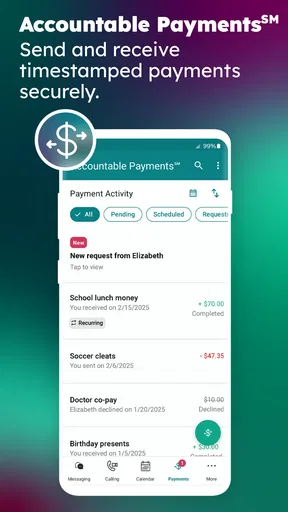
TalkingParents is a parenting app from Monitored Communications, LLC. Its tools bring together messages, calls, payments, calendars, and other coordination, with records designed for situations where keeping a clear account of communication matters. That combination is its defining advantage, but it also means it may feel more formal than a simple calendar or ordinary chat app. I would choose it for a real coordination need, not just because another app is available.
When a shared record makes a difference
The strongest case for this service is a family that benefits from having the same written history to refer back to. A routine conversation can become confusing when one parent remembers a change differently, especially if plans are made in a hurry. Keeping the discussion in the app gives both people a consistent place to review arrangements instead of searching through old messages on different phones.
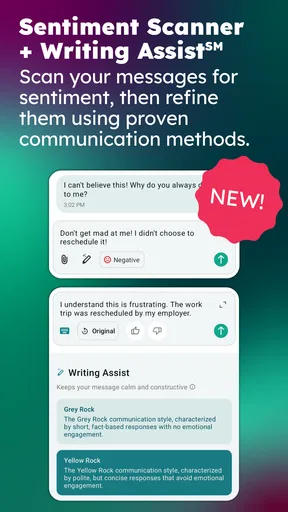
That record can also encourage more deliberate communication. When a parent is annoyed, writing a short, specific message about a schedule change is often more useful than sending a string of reactive texts. I’d treat the app as a place to state what needs to happen, when it needs to happen, and what response is needed—not as a way to settle every disagreement. A record can clarify what was communicated; it cannot make the other person cooperate or resolve a deeper conflict by itself.
A small workflow that prevents avoidable confusion
One practical way to use the calendar is to enter the recurring routine first, then use messages for exceptions. That creates a reference point for an ordinary week, while a one-off change—such as a different pickup arrangement—can be discussed in context. After agreeing on a change, I’d check that the calendar reflects it rather than assuming the message alone will be remembered later.
It also helps to keep requests narrow. Instead of combining a schedule question, a payment reminder, and a complaint about last month in one message, I’d separate the immediate decision from the broader issue. This is not a special technical trick; it is a useful way to make a written record easier to follow. The app’s value depends partly on both parents using it consistently and keeping messages focused.
Worth Reading Before You Choose

EA SPORTS FC Mobile 26 Is a Bigger Football Game, but It Takes Time

Flipboard Shows What News Apps Must Do Beyond the Feed

Switching to Android Auto Means Rethinking Your Driving Routine

Google Calendar Makes a Crowded Week Easier to Manage

Ludo King Makes the Most of the Minutes Between Plans

Baby Panda World Brings Quick Play to Modern Phones, but Its Game Library Feels Busy
Who may prefer a simpler alternative
If two parents already communicate calmly and reliably, a shared calendar and their usual messaging app may be easier to maintain. A general family organizer can suit people who mainly need reminders, while a standard payment tool may be more convenient when money is the only recurring coordination problem. Those options can involve less setup and feel less formal, though they may leave information split across services.
On the other hand, families who need a more organized communication history may find ordinary texting inadequate. Switching between messages, calendar entries, and payment records can make it harder to see the full picture. TalkingParents is most persuasive when bringing those parts together solves a problem the simpler tools have not. If one parent will not use the app, or both people do not agree to treat it as the place for current arrangements, the shared system may not deliver much benefit.
There is also a human trade-off: a structured record can help keep exchanges factual, but it can make routine coordination feel formal. For parents who have a cooperative relationship and no need for a documented history, that formality may be unnecessary. I’d choose the least complicated tool that both households will actually use.
What is TalkingParents?
Alright, so what's the deal with TalkingParents? It’s an app designed to help divorced or separated parents manage their communication and parenting schedules. It’s like having a personal assistant that never gets tired or asks for a coffee break. This app aims to keep things civil and organized, which, let’s face it, can be a game changer.
Setting Up and Getting Started
First things first, setting up TalkingParents is a walk in the park. Download the app from the App Store or Google Play, sign up, and you’re ready to roll. I found the interface pretty intuitive. Everything's laid out clearly, and it doesn’t take a tech wizard to get the hang of it. Just a few taps and you're in the driver’s seat.
Before relying on it for time-sensitive plans, I’d agree with the other parent on how you will use it: where schedule changes should be recorded, which calendar details matter, and what counts as confirmation. That simple conversation makes a shared tool much more dependable. It is also worth checking that both people can access the account and understand the same routine, rather than assuming that installing the app alone has solved a communication problem.
Features that Stand Out
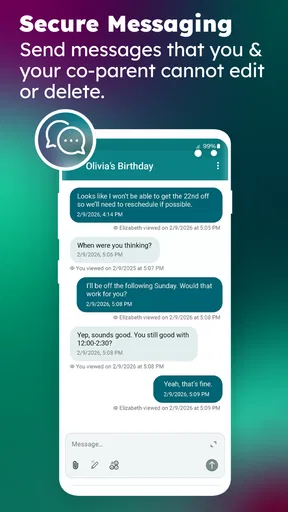
One of the standout features is the secure messaging system. Every message is recorded and cannot be altered, which means you have a reliable record of all communications. No more "he said, she said" scenarios! This feature alone makes it a must-have for anyone who needs to keep things transparent.
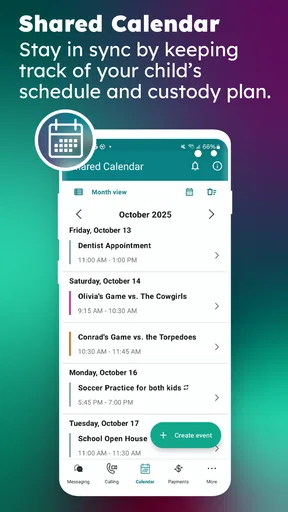
Scheduling is another area where this app shines. You can easily manage custody schedules, important dates, and even share documents. The calendar is shared between both parents, which helps keep everyone on the same page. Trust me, having everything centralized is a massive time (and sanity) saver.
For a busy week, the benefit is not only remembering a date; it is having the date alongside the conversation that explains a change. For example, if a child has an appointment during one parent’s usual time, the parents can discuss the practical adjustment and keep the calendar aligned with the agreed plan. I would still double-check important entries after a change, since a shared calendar is only useful when both people know which version reflects the current arrangement.
If you’re concerned about security, fear not. The app ensures that all your data is protected with top-notch security measures. It’s like having a digital vault for all your parenting communication.
Real-World Usage
Using TalkingParents feels like having a structured way to handle what can often be a chaotic situation. I’ve seen how stressful co-parenting can be, and having a tool that simplifies communication is incredibly valuable.
“It’s like having a referee who never takes sides!”
The app also offers a web version, which means you can switch between your phone and computer seamlessly. This flexibility is super handy, especially if you’re someone who likes to keep things organized on multiple devices.
A realistic use case is a school-night handoff: one parent notices that pickup needs to change, sends a clear message with the proposed time and location, and checks that the calendar reflects the agreed adjustment. The other parent can review the same record rather than relying on a hurried call or a recollection of a text thread. For less urgent matters, I’d avoid treating every message as an emergency; keeping routine updates distinct from time-critical requests makes the communication easier to manage.
What Could Be Better?
Now, no app is perfect, right? While TalkingParents does a fantastic job, I did notice a few hiccups. Sometimes, notifications can be a bit delayed, which might be a tad frustrating if you’re waiting for an urgent reply. Also, the premium features, like downloading PDF records or accessing the phone call service, come at a cost. It’s worth considering if these extras are something you’d actually use before shelling out the cash.
I would not make the app the only plan for a truly urgent change. If a child is waiting at pickup or an immediate response is essential, a delayed notification can matter, so use an agreed direct contact method when speed is critical and then keep the relevant arrangement documented. That is a sensible backup, not a reason to expect any messaging service to guarantee instant attention.
The app is free to start, while optional in-app purchases range from twelve dollars to two hundred forty-nine dollars and ninety-nine cents per item. That wide span makes it especially important to check what a paid option actually gives you before buying; a family that only needs everyday coordination may not need the same extras as someone who values downloadable records or the call service. I would decide based on a specific need rather than assuming that paying automatically improves communication.
Cost is only one part of switching. Both parents need to adopt the same routine, and older arrangements may still be sitting in text threads or separate calendars. I’d pick a clear start point, put the current schedule in the shared calendar, and use the app for new conversations from then on. If an older agreement is still important, make sure both parents can find or restate the practical details instead of assuming the new app has imported them.
How it fits among co-parenting tools
TalkingParents sits between informal communication and a collection of separate organizers. Compared with ordinary texting, its appeal is a more structured record and a shared place for parenting logistics. Compared with a basic calendar, it covers more than dates, while a general family-planning app may feel simpler for parents who already trust their communication and just want reminders. These are different trade-offs rather than a universal ranking: the right choice depends on whether the family needs a record, a calendar, or simply fewer apps.
The app is aimed at co-parents, but it is not a substitute for legal advice, a parenting agreement, or a conversation about how decisions should be made. If a dispute concerns the meaning of a formal order, I would not rely on an app interface to interpret it. The store describes its communications as court-approved, but users should still follow any instructions that apply to their own circumstances and confirm what documentation they need with an appropriate professional.
Compatibility, audience, and expectations
TalkingParents is free to download and is rated for everyone, though its purpose is specifically relevant to parents coordinating across households. It was released on June 3, 2016, and version 9.0.3 requires iOS 11 or later. Its reach is over one hundred thousand installs, while its average rating is 2.6 from around three thousand five hundred ratings, with about one thousand eight hundred written reviews. I would read that modest rating as a reason to weigh the app’s fit and friction carefully, not as proof that it will or will not work for a particular family.
That matters when deciding whether to ask the other parent to move over. If they are comfortable with a shared system and both need a clearer record, trying the free app can be a reasonable first step. If they strongly prefer existing tools, or if using a formal communication channel would inflame rather than calm exchanges, a simpler shared calendar and a mutually agreed messaging method may be more realistic. A tool only helps when its routine is workable for both people.
Final Thoughts
All in all, TalkingParents: Co-Parent App is a solid choice for anyone navigating the waters of co-parenting. It brings organization, clarity, and peace of mind to an otherwise stressful part of life. Sure, there are a few quirks, but the benefits far outweigh any minor inconveniences.
If you’re ready to take your co-parenting game to the next level, give this app a whirl. You’ll thank yourself later! Happy parenting, folks!
My recommendation is specific: choose it when shared messages, calls, payments, and scheduling need a more orderly home, and both parents are prepared to use that home consistently. Skip it if you only need a basic calendar, if your current system is already working, or if the other parent will not participate. The 2.6 average rating is a reason to approach it with realistic expectations and test whether its workflow suits your family. For people who need documented, centralized coordination, it is worth considering; for everyone else, the simpler option may be the better one.
Pros
- Easy-to-use interface for all users.
- Secure messaging with time-stamped records.
- Shared calendar for scheduling and events.
- Unlimited document storage for co-parents.
- Available on both Android and iOS.
Cons
- Requires premium for some features.
- No real-time notifications for free users.
- Limited customization for the calendar.
- App can be slow on older devices.
- No video call feature available.
FAQs for TalkingParents: Co-Parent App
What is TalkingParents: Co-Parent App used for?
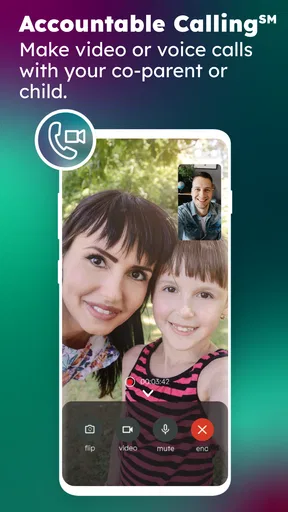
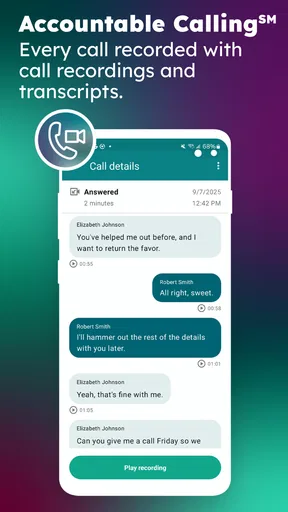
TalkingParents is designed to facilitate seamless communication between co-parents. It provides a secure platform for messaging, calling, and sharing documents, ensuring that all interactions are documented. This helps in reducing conflicts and misunderstandings, providing a reliable record that can be used in legal situations if necessary.
Is TalkingParents secure for private conversations?
Yes, TalkingParents prioritizes security by offering end-to-end encryption for all communications. This means that only you and the other parent can read your messages. Additionally, the app maintains a secure record of all interactions, which can be accessed whenever needed, ensuring privacy and accountability.
Does TalkingParents offer any features for scheduling and organizing?
Absolutely. The app includes a shared calendar feature that allows co-parents to coordinate schedules for children’s activities, visitation, and appointments. This feature helps reduce scheduling conflicts and ensures both parents are on the same page regarding their children’s commitments.
Is there a cost associated with using TalkingParents?
TalkingParents offers a free version with basic features, but for advanced functionalities like calling and downloading PDFs of communication records, a subscription is required. The premium version provides enhanced tools that can be invaluable for co-parents needing detailed documentation and additional features.
Can TalkingParents be used in legal situations?
Yes, one of the key benefits of TalkingParents is that it provides a comprehensive and unalterable record of all communications. These records are often admissible in court, making them a reliable resource for legal proceedings involving custody or visitation disputes.


